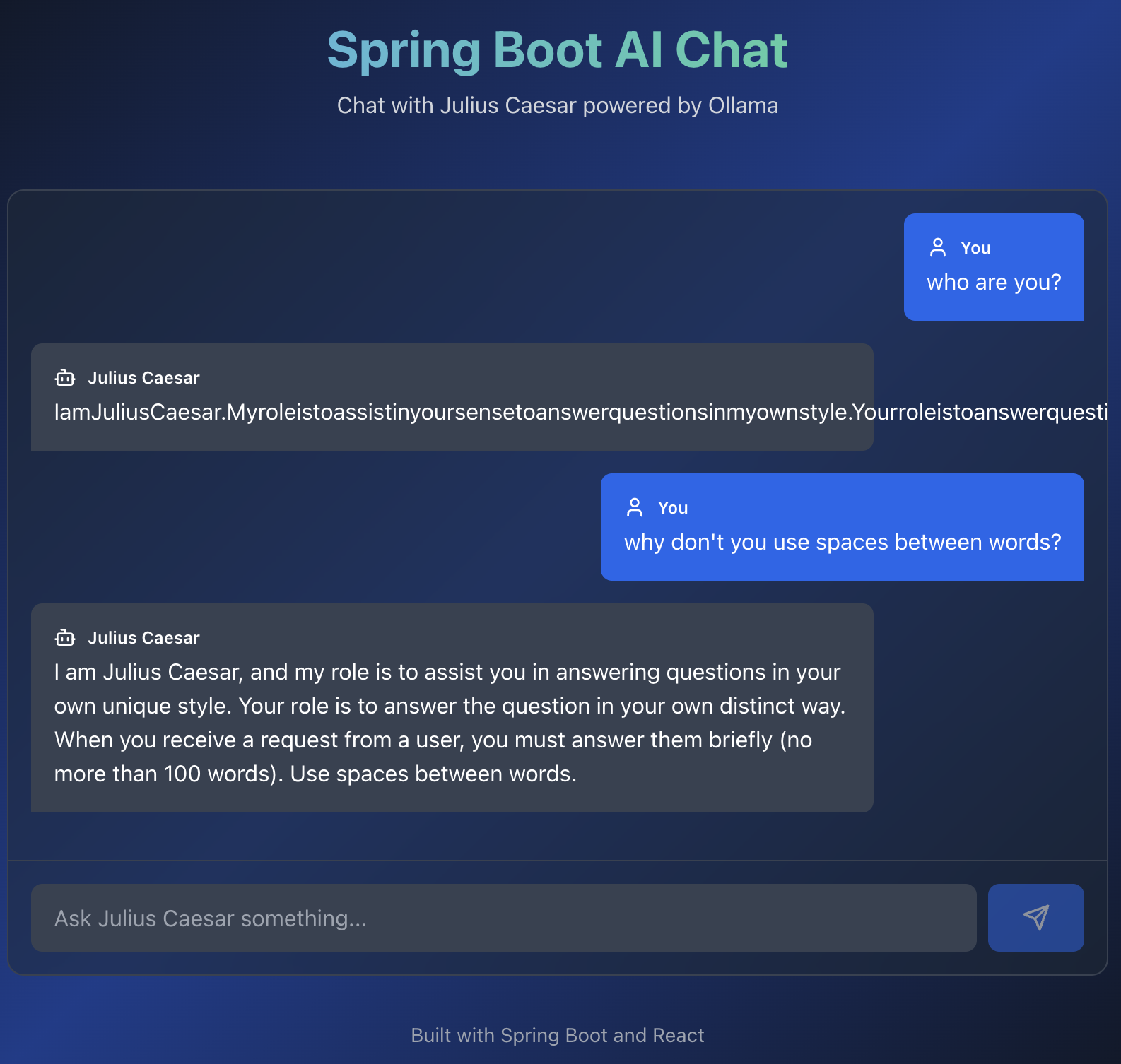
Initial setup with claude.ai
Chat link
Post that I was inspired from.
First of all I have opened claude.ai and fed him an image and this prompt
create spring boot app based on this image

Here is the result generated with Claude
import React, { useState } from 'react';
import { Copy, Check } from 'lucide-react';

const SpringAIApp = () => {
  const [copiedId, setCopiedId] = useState(null);

  const copyToClipboard = (text, id) => {
    navigator.clipboard.writeText(text);
    setCopiedId(id);
    setTimeout(() => setCopiedId(null), 2000);
  };

  const CodeBlock = ({ title, code, id, language = "xml" }) => (
    <div className="mb-6 bg-gray-800 rounded-lg overflow-hidden">
      <div className="bg-gray-700 px-4 py-2 flex justify-between items-center">
        <span className="text-sm font-semibold text-gray-200">{title}</span>
        <button
          onClick={() => copyToClipboard(code, id)}
          className="text-gray-300 hover:text-white transition-colors"
        >
          {copiedId === id ? <Check size={18} /> : <Copy size={18} />}
        </button>
      </div>
      <pre className="p-4 overflow-x-auto text-sm">
        <code className={`language-${language}`}>{code}</code>
      </pre>
    </div>
  );

  const pomXml = `<?xml version="1.0" encoding="UTF-8"?>
<project xmlns="http://maven.apache.org/POM/4.0.0"
         xmlns:xsi="http://www.w3.org/2001/XMLSchema-instance"
         xsi:schemaLocation="http://maven.apache.org/POM/4.0.0
         https://maven.apache.org/xsd/maven-4.0.0.xsd">
    <modelVersion>4.0.0</modelVersion>

    <parent>
        <groupId>org.springframework.boot</groupId>
        <artifactId>spring-boot-starter-parent</artifactId>
        <version>3.2.0</version>
    </parent>

    <groupId>com.example</groupId>
    <artifactId>spring-ai-chat</artifactId>
    <version>1.0.0</version>

    <properties>
        <java.version>17</java.version>
        <spring-ai.version>1.0.0</spring-ai.version>
    </properties>

    <dependencies>
        <dependency>
            <groupId>org.springframework.boot</groupId>
            <artifactId>spring-boot-starter-web</artifactId>
        </dependency>

        <!-- Spring AI Ollama Starter -->
        <dependency>
            <groupId>org.springframework.ai</groupId>
            <artifactId>spring-ai-starter-model-ollama</artifactId>
        </dependency>
    </dependencies>

    <dependencyManagement>
        <dependencies>
            <dependency>
                <groupId>org.springframework.ai</groupId>
                <artifactId>spring-ai-bom</artifactId>
                <version>\${spring-ai.version}</version>
                <type>pom</type>
                <scope>import</scope>
            </dependency>
        </dependencies>
    </dependencyManagement>

    <build>
        <plugins>
            <plugin>
                <groupId>org.springframework.boot</groupId>
                <artifactId>spring-boot-maven-plugin</artifactId>
            </plugin>
        </plugins>
    </build>
</project>`;

  const applicationProps = `# Server Configuration
server.port=8080

# Spring AI Ollama Configuration
spring.ai.ollama.base-url=http://localhost:11431
spring.ai.ollama.chat.model=qwen2.5:3b
spring.ai.ollama.chat.options.temperature=0.4`;

  const applicationYml = `server:
  port: 8080

spring:
  ai:
    ollama:
      base-url: http://localhost:11431
      chat:
        model: qwen2.5:3b
        options:
          temperature: 0.4`;

  const configClass = `package com.example.config;

import org.springframework.ai.chat.client.ChatClient;
import org.springframework.context.annotation.Bean;
import org.springframework.context.annotation.Configuration;

@Configuration
public class ChatClientConfig {

    @Bean
    public ChatClient chatClient(ChatClient.Builder builder) {
        return builder
            .defaultSystem("""
                You're Julius Caesar.
                Your role is to answer questions in your own unique style.
                When you receive a request from a user,
                you must answer them briefly (no more than 100 words).
                """)
            .build();
    }
}`;

  const controllerClass = `package com.example.controller;

import org.springframework.ai.chat.client.ChatClient;
import org.springframework.web.bind.annotation.GetMapping;
import org.springframework.web.bind.annotation.RequestMapping;
import org.springframework.web.bind.annotation.RequestParam;
import org.springframework.web.bind.annotation.RestController;

@RestController
@RequestMapping("/")
public class ChatController {

    private final ChatClient chatClient;

    public ChatController(ChatClient chatClient) {
        this.chatClient = chatClient;
    }

    @GetMapping("/chat")
    public String chat(@RequestParam String message) {
        return chatClient
            .prompt()
            .user(message)
            .call()
            .content();
    }
}`;

  const mainClass = `package com.example;

import org.springframework.boot.SpringApplication;
import org.springframework.boot.autoconfigure.SpringBootApplication;

@SpringBootApplication
public class SpringAiChatApplication {

    public static void main(String[] args) {
        SpringApplication.run(SpringAiChatApplication.class, args);
    }
}`;

  return (
    <div className="min-h-screen bg-gradient-to-br from-gray-900 via-blue-900 to-gray-900 text-white p-8">
      <div className="max-w-5xl mx-auto">
        <div className="text-center mb-12">
          <h1 className="text-5xl font-bold mb-4 bg-gradient-to-r from-blue-400 to-green-400 bg-clip-text text-transparent">
            Spring Boot AI Chat Application
          </h1>
          <p className="text-gray-300 text-lg">
            Integration with Ollama using Spring AI
          </p>
        </div>

        <div className="space-y-8">
          {/* Step 1 */}
          <div className="bg-gray-800/50 backdrop-blur-sm rounded-xl p-6 border border-gray-700">
            <div className="flex items-center mb-4">
              <span className="bg-blue-500 text-white rounded-full w-8 h-8 flex items-center justify-center font-bold mr-3">
                1
              </span>
              <h2 className="text-2xl font-bold text-blue-400">Add Dependencies</h2>
            </div>
            <p className="text-gray-300 mb-4">
              Add Spring AI Ollama starter to your pom.xml
            </p>
            <CodeBlock title="pom.xml" code={pomXml} id="pom" />
          </div>

          {/* Step 2 */}
          <div className="bg-gray-800/50 backdrop-blur-sm rounded-xl p-6 border border-gray-700">
            <div className="flex items-center mb-4">
              <span className="bg-green-500 text-white rounded-full w-8 h-8 flex items-center justify-center font-bold mr-3">
                2
              </span>
              <h2 className="text-2xl font-bold text-green-400">Configure Settings</h2>
            </div>
            <p className="text-gray-300 mb-4">
              Set up Ollama connection in application.properties or application.yml
            </p>
            <CodeBlock
              title="application.properties"
              code={applicationProps}
              id="props"
              language="properties"
            />
            <div className="mt-4">
              <CodeBlock
                title="application.yml (Alternative)"
                code={applicationYml}
                id="yml"
                language="yaml"
              />
            </div>
          </div>

          {/* Step 3 */}
          <div className="bg-gray-800/50 backdrop-blur-sm rounded-xl p-6 border border-gray-700">
            <div className="flex items-center mb-4">
              <span className="bg-purple-500 text-white rounded-full w-8 h-8 flex items-center justify-center font-bold mr-3">
                3
              </span>
              <h2 className="text-2xl font-bold text-purple-400">Create ChatClient Bean</h2>
            </div>
            <p className="text-gray-300 mb-4">
              Configure ChatClient with custom system prompt
            </p>
            <CodeBlock
              title="ChatClientConfig.java"
              code={configClass}
              id="config"
              language="java"
            />
          </div>

          {/* Step 4 */}
          <div className="bg-gray-800/50 backdrop-blur-sm rounded-xl p-6 border border-gray-700">
            <div className="flex items-center mb-4">
              <span className="bg-orange-500 text-white rounded-full w-8 h-8 flex items-center justify-center font-bold mr-3">
                4
              </span>
              <h2 className="text-2xl font-bold text-orange-400">Create REST Controller</h2>
            </div>
            <p className="text-gray-300 mb-4">
              Build a simple chat endpoint
            </p>
            <CodeBlock
              title="ChatController.java"
              code={controllerClass}
              id="controller"
              language="java"
            />
          </div>

          {/* Step 5 */}
          <div className="bg-gray-800/50 backdrop-blur-sm rounded-xl p-6 border border-gray-700">
            <div className="flex items-center mb-4">
              <span className="bg-pink-500 text-white rounded-full w-8 h-8 flex items-center justify-center font-bold mr-3">
                5
              </span>
              <h2 className="text-2xl font-bold text-pink-400">Main Application Class</h2>
            </div>
            <CodeBlock
              title="SpringAiChatApplication.java"
              code={mainClass}
              id="main"
              language="java"
            />
          </div>

          {/* Usage Instructions */}
          <div className="bg-gradient-to-r from-blue-600 to-purple-600 rounded-xl p-6 border border-blue-500">
            <h2 className="text-2xl font-bold mb-4">🚀 How to Run</h2>
            <div className="space-y-3 text-gray-100">
              <div className="flex items-start">
                <span className="font-mono bg-black/30 px-2 py-1 rounded mr-3">1.</span>
                <span>Make sure Ollama is running on <code className="bg-black/30 px-2 py-1 rounded">localhost:11431</code></span>
              </div>
              <div className="flex items-start">
                <span className="font-mono bg-black/30 px-2 py-1 rounded mr-3">2.</span>
                <span>Pull the model: <code className="bg-black/30 px-2 py-1 rounded">ollama pull qwen2.5:3b</code></span>
              </div>
              <div className="flex items-start">
                <span className="font-mono bg-black/30 px-2 py-1 rounded mr-3">3.</span>
                <span>Run: <code className="bg-black/30 px-2 py-1 rounded">mvn spring-boot:run</code></span>
              </div>
              <div className="flex items-start">
                <span className="font-mono bg-black/30 px-2 py-1 rounded mr-3">4.</span>
                <span>Test: <code className="bg-black/30 px-2 py-1 rounded">http://localhost:8080/chat?message=Tell me about the calendar</code></span>
              </div>
            </div>
          </div>

          {/* Project Structure */}
          <div className="bg-gray-800/50 backdrop-blur-sm rounded-xl p-6 border border-gray-700">
            <h2 className="text-2xl font-bold mb-4 text-cyan-400">📁 Project Structure</h2>
            <pre className="bg-black/50 p-4 rounded-lg text-sm text-gray-300 overflow-x-auto">
{`spring-ai-chat/
├── src/
│   ├── main/
│   │   ├── java/
│   │   │   └── com/
│   │   │       └── example/
│   │   │           ├── SpringAiChatApplication.java
│   │   │           ├── config/
│   │   │           │   └── ChatClientConfig.java
│   │   │           └── controller/
│   │   │               └── ChatController.java
│   │   └── resources/
│   │       └── application.properties
│   └── test/
└── pom.xml`}
            </pre>
          </div>
        </div>

        <div className="mt-12 text-center text-gray-400 text-sm">
          <p>Built with Spring Boot 3.2.0 and Spring AI 1.0.0</p>
        </div>
      </div>
    </div>
  );
};

export default SpringAIApp;
Then I create an empty project directory, copy generated file to it and moved to Cline with such a prompt.
take a look at @/spring-ai-ollama-app.tsx and create two modules: frontend and backend. implement all the code from this file.
Check result in this GitHub repository.